
Feature Adoption: Deeplink-Driven Discovery

Updated 08 Oct 2026
You shipped that new export feature three sprints ago. The engineering team celebrated. Product wrote a changelog entry. And yet, looking at your analytics dashboard, barely 8% of active users have tried it. Sound familiar? A large share of features shipped into a mature app quietly stay undiscovered — not because they lack value, but because users never stumble onto them inside their existing habit loop.
In this guide, we'll walk through a practical pattern for driving feature adoption using Amply's deeplink-driven discovery campaigns. Instead of hoping users stumble onto your best work, you'll proactively guide them there at exactly the right moment in their journey.
Why Users Miss Your Best Features
Before jumping into the solution, it's worth understanding why feature discovery is so hard. Most mobile apps suffer from the same three blind spots:
- Habit loops are powerful. Once users establish a routine with your core flow, they rarely explore beyond it. They open, do their thing, and leave. That sidebar menu with your new feature? Invisible.
- Onboarding can't cover everything. A new user's attention during first launch is measured in seconds, not minutes. You can introduce one or two concepts, tops. Everything else has to wait for later sessions.
- Changelogs don't drive behavior. A "What's New" modal on update is easily dismissed. Users don't read release notes. Showing them the feature in context is what changes behavior.
The best features don't sell themselves. You have to introduce them at the moment a user is most ready to benefit.
The Progressive Discovery Pattern
Progressive discovery is a design strategy where you reveal features incrementally, matching the user's growing familiarity with your app. Instead of front-loading every feature into onboarding, you introduce them gradually across sessions.
Here's the core idea applied to in-app campaigns:
- Early sessions: let the user settle in. They're learning your core flow.
- Mid sessions (a good starting window is 3-5): the user is engaged but hasn't locked into a rigid routine. A natural moment to surface a new feature.
- Later sessions: the habit loop is forming. Gentle nudges work less well; you'll need a stronger or more contextual intervention.
The trick is to pair this timing with a concrete action: a deeplink that takes the user directly to the feature screen, removing all friction. No hunting through menus. No guesswork. One tap, and they're experiencing the feature firsthand.
Setting Up Feature Discovery Campaigns with Amply
Let's build a real example. Say your app has an "Export to PDF" feature that's been live for a month, but adoption is flat. Here's how to set up a deeplink-driven discovery campaign using Amply.
Step 1: Define the Trigger Event
First, decide what user action should trigger the campaign. You want to catch users at a moment of engagement, right after they've completed a meaningful action in your app. This is where Amply's event-based triggering comes in.
// Android (Kotlin). Track the core action that signals user engagement.
// This fires when the user completes their primary workflow.
// `amply` is your app-scoped Amply instance (see SDK docs for setup).
amply.track("CoreActionCompleted")
In the Amply dashboard, you'll configure your campaign to trigger on the CoreActionCompleted event. The campaign only displays after the event, ensuring you're reaching users who are actively engaged, not passively browsing.
Step 2: Configure the Deeplink Action
Instead of showing a generic banner or tooltip, your campaign's call-to-action uses a deeplink that navigates the user directly to the feature screen. In the Amply dashboard, set the campaign action URL to your custom scheme happens://feature-discovery:
happens://feature-discoveryThis URL is handled by your app's deeplink handler. When the user taps the campaign CTA, they land directly on the Export feature screen with a contextual tooltip, no navigation required.
Targeting: Finding the Right Users at the Right Time
Showing a feature discovery campaign to every user is wasteful and annoying. Someone who already uses the Export feature doesn't need a nudge. A brand-new user isn't ready for it yet. Amply's targeting rules let you get precise.
Here is the campaign configuration in the Amply dashboard:
Feature discovery: promote recently-shipped feature
- WhoCustom Property—
has_used_new_feature(Boolean)= equalfalse - WhoInstall Date—
is more than3days ago (so brand-new installs finish onboarding first) - WhenTriggering Event— event
SessionStart - WhenRepeat Rules—
every2globally - WhenFrequency Limits— show campaign
3times, time interval between impressions at least48hours - WhatDeeplink—
happens://feature-discovery
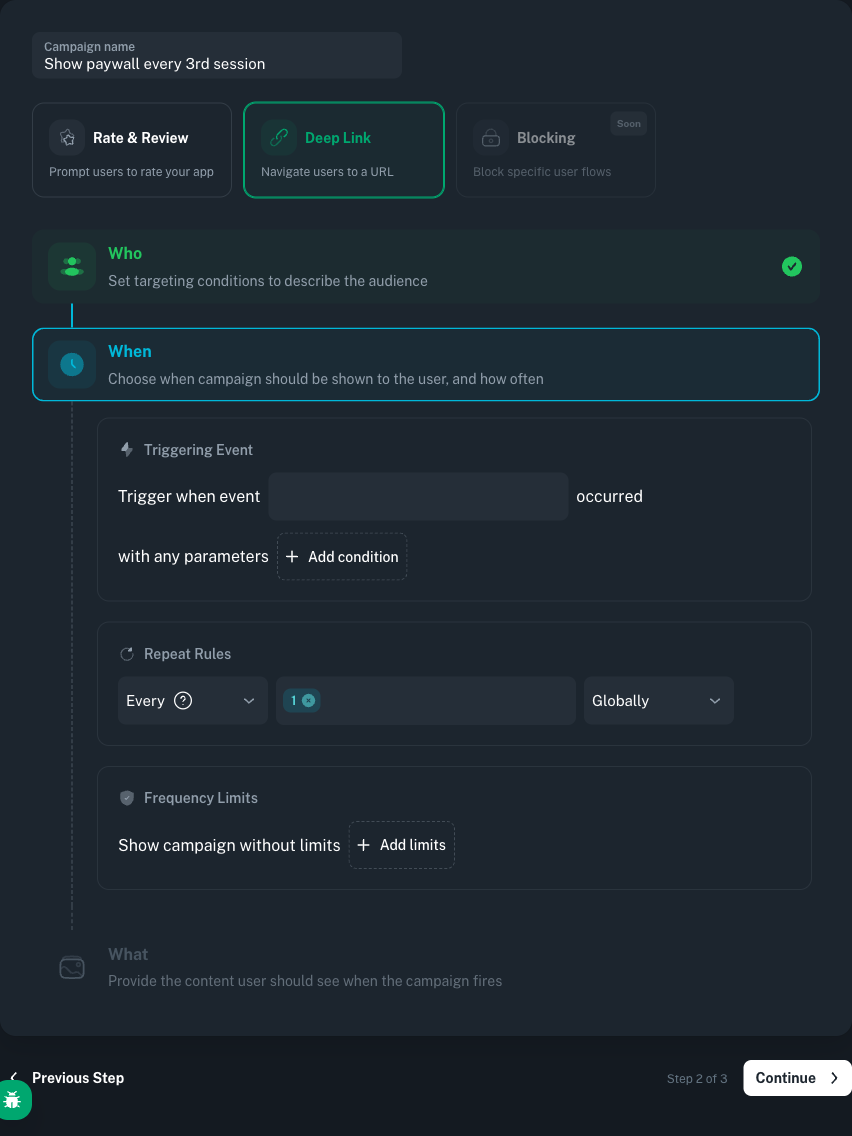
This setup gives a returning user gentle, spaced-out nudges to try the new feature — no more than 3 times total, and at least 48 hours apart. Once the user opens the feature, your app sets has_used_new_feature=true via amply.setCustomProperty(...) on your Amply instance, and the campaign stops firing automatically.
Session-Window Targeting via a Custom Property
To scope the campaign to a progressive-introduction window (for example sessions 3 through 5), maintain a session counter in your app and push it to Amply as a Custom Property. You can then target that property in the Who step — Amply does not expose a built-in "session count" condition, so the counter lives in your code and Amply matches on it.
// Android (Kotlin). Increment and push on each session start.
// `amply` is your Amply instance.
val sessionCount = prefs.getInt("session_count", 0) + 1
prefs.edit().putInt("session_count", sessionCount).apply()
amply.setCustomProperty("session_count", sessionCount)

// In the dashboard, Who step -> Custom Property:
//   key:        session_count
//   type:       Number
//   comparator: >= greater or equal, value 3
//   AND another rule: <= less than or equal, value 5
Excluding Users Who Already Use the Feature
You only want the campaign to reach users who haven't used Export yet. Amply doesn't offer a built-in "user fired event X" / "user did not fire event X" condition — the supported pattern is to keep the flag on the client and push it as a Custom Property. Once the flag flips, the targeting rule stops matching and the campaign stops firing.
// Android (Kotlin). Initialise the flag once (e.g., on first install or first session).
amply.setCustomProperties(mapOf(
    "has_used_export" to false
))

// When the user actually uses the feature, flip the flag:
amply.setCustomProperty("has_used_export", true)
The combination of session count targeting and negative event targeting ensures your campaign reaches exactly the right audience: engaged users who are ready for the feature but haven't found it on their own.
Code Implementation
Here's the complete integration. The code below ties together event tracking, deeplink handling, and discovery measurement into a cohesive flow.
Deeplink Handler Setup
Register a deeplink listener on your Amply instance early in the app lifecycle via registerDeepLinkListener. When Amply triggers a campaign with a Deeplink action, the listener receives the URL and your app routes the user to the correct screen.
// Android (Kotlin). Set up the deeplink listener during app initialization.
// `amply` is your app-scoped Amply instance.
import tools.amply.sdk.actions.DeepLinkListener

amply.registerDeepLinkListener(object : DeepLinkListener {
    override fun onDeepLink(url: String, info: Map<String, Any>): Boolean = when {
        url.contains("feature-discovery") -> {
            navigateToFeatureScreen()
            // Track that the user reached the discovery screen.
            amply.track("FeatureXDiscovered")
            true
        }
        url.contains("advanced-tips") -> {
            navigateToTipsScreen()
            true
        }
        else -> false
    }
})
Trigger Event Integration
Place the trigger event at the natural completion point of your core workflow. This is the moment Amply evaluates whether to show the campaign.
// Android (Kotlin). Example: user finishes creating a report.
// `amply` is your app-scoped Amply instance.
fun onReportCreated(report: Report) {
    saveReport(report)

    // This event triggers Amply's campaign evaluation.
    amply.track("CoreActionCompleted")

    // Amply checks, against the rules configured in the dashboard:
    // 1. session_count custom property between 3 and 5?
    // 2. has_used_export custom property still false?
    // If all conditions match -> the discovery campaign fires
    //    and the configured Deeplink action is delivered to the listener.
}
Feature Usage Tracking
Once the user actually tries the feature, track it both in Amply (to stop showing the campaign) and in your analytics platform (to measure long-term adoption).
// Android (Kotlin). When the user actually uses the Export feature.
// `amply` is your app-scoped Amply instance.
fun onExportUsed(document: Document) {
    // Update Amply properties to suppress future campaigns.
    amply.setCustomProperty("has_used_export", true)

    // Track in your analytics platform for adoption metrics.
    Amplitude.track("FeatureXUsed", mapOf(
        "source" to "discovery_campaign",
        "session_number" to currentSessionCount
    ))
}
Measuring Feature Adoption Impact
A discovery campaign without measurement is just a guess. Here's how to build a clear picture of what's working.
The Discovery Funnel
Track three key events to build a complete adoption funnel:
- Campaign Shown — every campaign impression is recorded per campaign and visible in the campaign's statistics view in the dashboard. Use this as your "top of the funnel" number.
- Feature Discovered — Tracked via
amply.track("FeatureXDiscovered"). How many users tapped through the deeplink? - Feature Adopted — Tracked via
Amplitude.track("FeatureXUsed"). How many users came back and used the feature on their own?
What to Expect
What a well-configured discovery campaign gives you:
- A measurable lift in adoption inside the targeted segment, compared to users who never saw the prompt — Amply lets you run and measure that comparison in your own app rather than promising a fixed number.
- Clear data on which features resonate at which point in the user journey, informing your product roadmap.
- A path to reduce churn on users who never discover the parts of the app that match their intent.
When you stop hoping users will find your features and start guiding them there, adoption stops being a mystery and becomes a metric you can control.
Conclusion
Shipping a great feature is only half the job. The other half is making sure the right users find it at the right time. With Amply's event-based triggering, session count targeting, negative event filtering, and deeplink actions, you can build discovery campaigns that feel like a natural part of the user experience rather than a disruptive popup.
The pattern is straightforward: track a core action, target users in the sessions 3-5 window who haven't yet used the feature, and deeplink them directly to the screen where they can experience it firsthand. Measure discovery and adoption separately to understand where users drop off.
Your best features deserve to be found. Stop relying on changelogs and menu exploration. Start building campaigns that bring users directly to the value you've already built for them.