
A Reminder Campaign With Zero App Changes

Updated 15 Oct 2026
For a product team, a “you haven't done this in a while” reminder is rarely held up by the idea. It is held up by the release: the audience rule, the moment, the copy and every later tweak usually live in the app's code, so each change waits for a build and a store review. This post walks through one we set up in a real app, nite.dog, where none of that touched the app.
It is a weigh-in reminder that appears only when no new weight has been logged on that phone for a month, only when the person opened the app on their own, and only once. Every condition is built from events the app was already sending.
- App releases: 0. The audience, the moment, the limit and the sheet itself all live in Amply.
- What the app already had: two events that carry a little context, and one deep link.
- Who set it up: the app's owner with two coding agents, in one working session. It went live only after the owner said yes.
- What decides whether it stays: a bar the team set before launch: after 50 impressions, at least 15% should end with a weight logged.
We follow the brief the way the team wrote it: the problem, the hypothesis, the scenario, every case where the reminder must stay quiet, and the number that decides whether it keeps running. The campaign went live on 15 October, so this post covers the setup; the results aren't in yet.
The problem
nite.dog is a shared care tracker for dogs: medications, vaccines, vet visits, feeding, and weight. Weight is one of the slowest-moving and most useful numbers in it. A dog's weight can drift with illness, age or neutering, and several common dog medications are dosed by weight. The drift is often too gradual to notice by eye.
In practice, people usually enter the weight once, during setup, and stop. The weight card keeps showing the same number, and the chart that exists to show where the weight is heading never gets a second point.
The hypothesis
If people who haven't logged a weight in a month are asked once, at a calm moment, with a button that opens the weigh-in screen directly, a noticeable share of them will log one in the same session. The second reading turns a number into a trend.
That is the bar from the summary above, and it was set before launch, before any numbers came in.
The scenario
The owner opens the app from its icon in the morning to see what's due today. The dog was last weighed six weeks ago. A sheet slides up over the home screen: “Been a while since the last weigh-in?” They tap “Log weight”, which opens the weigh-in screen for their dog, then enter the number and save. The weight card now shows the change since last time.
What the app already sent
The rule for this campaign came from the app's owner: no campaign logic in the app. The app reports facts about itself, and Amply decides what to do with them. These facts were already there:
- A weigh-in event. Every new weigh-in reports
RecordSavedwithtype = measurement,kind = weightandaction = created, including the weight entered during setup. Correcting an old entry reportsaction = editedinstead. - A screen event that knows how you arrived. Every screen reports
ScreenShownwith itsnameand asource:launchwhen the app was opened from its icon,notificationfrom a reminder,linkfrom a link or an invite,campaignfrom an Amply campaign. - A deep link to the weigh-in screen.
nite://log-measurement?kind=weightopens the weigh-in screen for the currently selected dog.
Step 1 — Who: no weigh-in for a month
No new weigh-in in 30 days, and not a first-week user
- WhoInstall Date— more than
7days ago - WhoEvent—
RecordSavedlast happened not in the last30days, or never, withtype = measurement,kind = weight,action = created
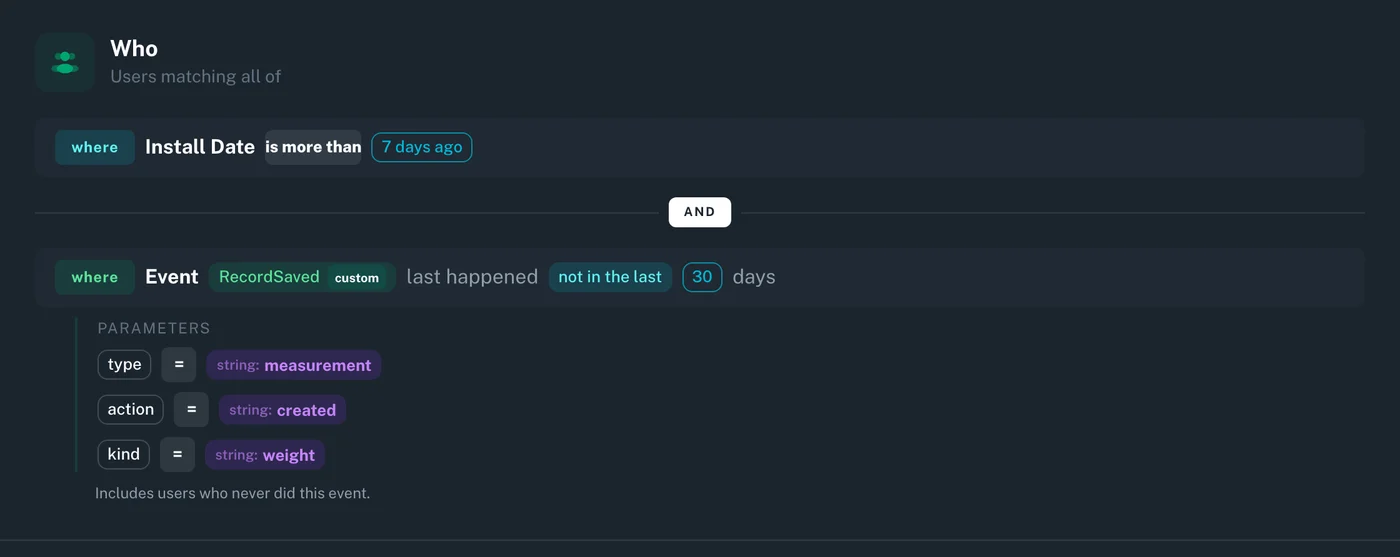
Time since the last weigh-in, or never. In plain words: people who haven't logged a new weight for a month, including those who never have. Leave out “never” and the people who most need the reminder drop out of it.
Count only real weigh-ins. The filter requires action = created. Without it, fixing a typo in an old entry would reset the 30-day clock, as if the dog had just been weighed.
Two things to know about history
“Never” includes everything before tracking. An event condition only sees the events Amply has recorded on that phone since the app started sending them. Someone who weighed their dog a week before that has no weigh-in on record, so to Amply it is “never”. They get asked once; the team accepted that. In a campaign where it matters, send the date of the last weigh-in from your own data as a custom property instead.
Install date starts with Amply, not with the app. It is the first time Amply ran on the phone, so in an app that adds Amply later, existing users start that clock the first time they open a version with Amply in it. A 30-day limit would have matched nobody for a month after Amply shipped; seven days still keeps the first week clean for new users.
Step 2 — When: the app opened from its icon
On the home screen, after opening the app from its icon
- WhenTrigger—
ScreenShownwithname = Today,source = launch - WhenLimit— show at most
1time
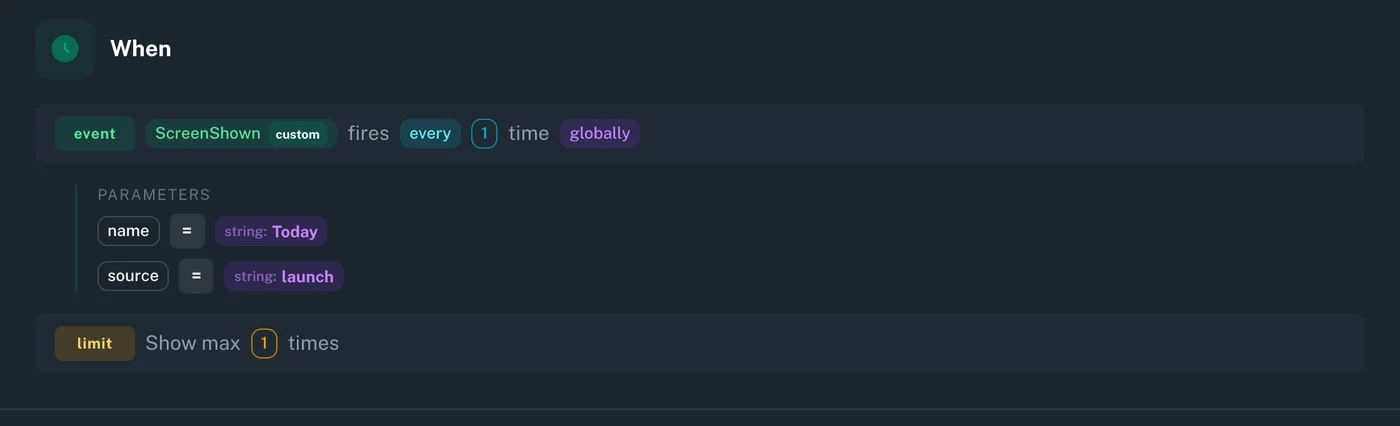
Pick the moment by how the person arrived. Someone who tapped a dose reminder came to mark a dose. Someone who followed a link came to see what it points to. Both are in the middle of something, and a sheet about weight would be in the way. Someone who opened the app from its icon and landed on the home screen (Today) is less likely to be. The source parameter tells these apart.
Once is enough. A person who says “Not now” has answered. A reminder that keeps coming back can teach people to dismiss it without reading.
Step 3 — What: a sheet that looks like the app
The reminder is a bottom sheet built in Amply Studio. It uses the app's colors (paper background, blue accent), its button shapes, and its rule that the main button sits at the bottom with the secondary option above it. It has light and dark versions, and comes in English and Russian; the device language decides which language is shown. “Log weight” is the label the app already uses on its own weigh-in button.
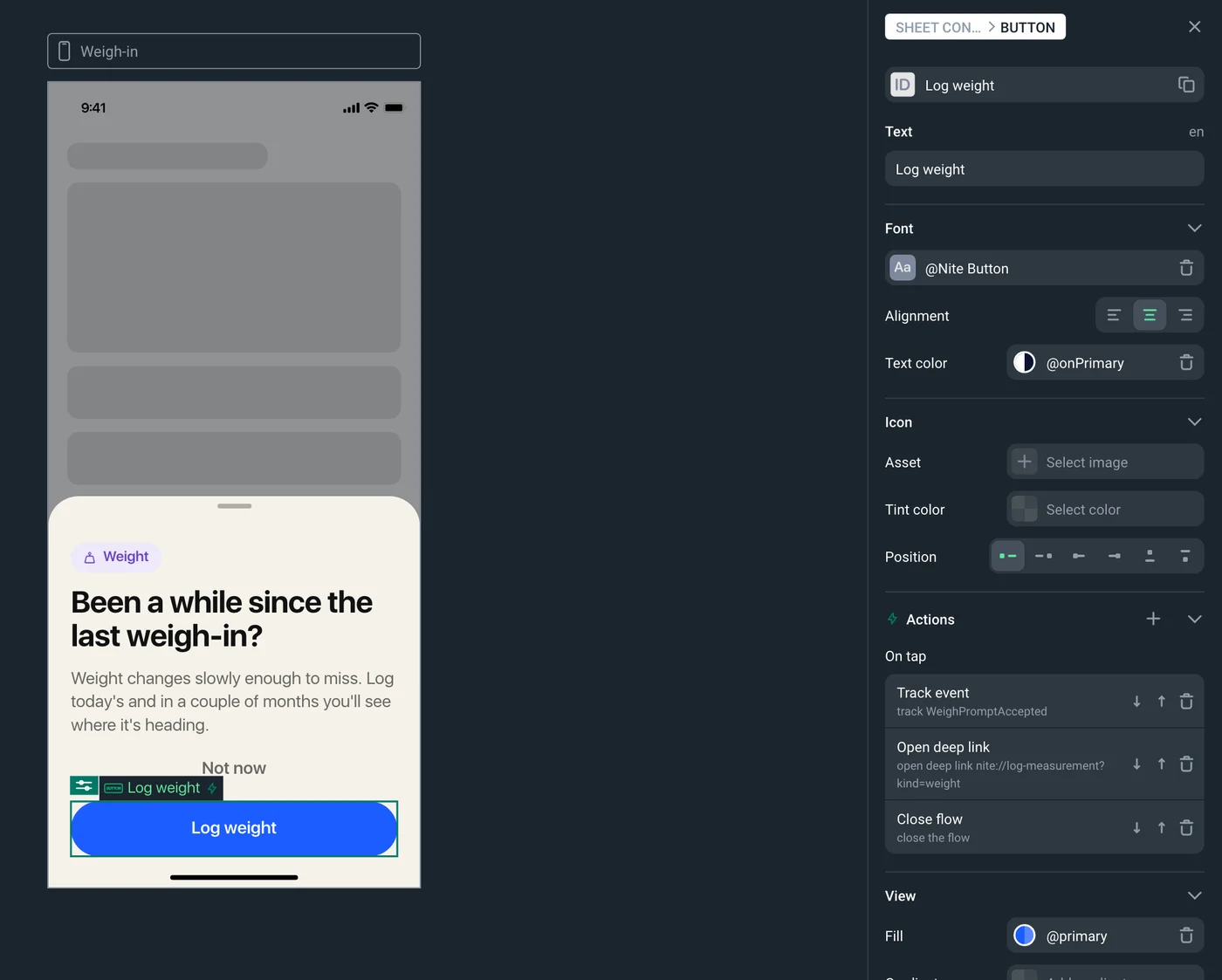
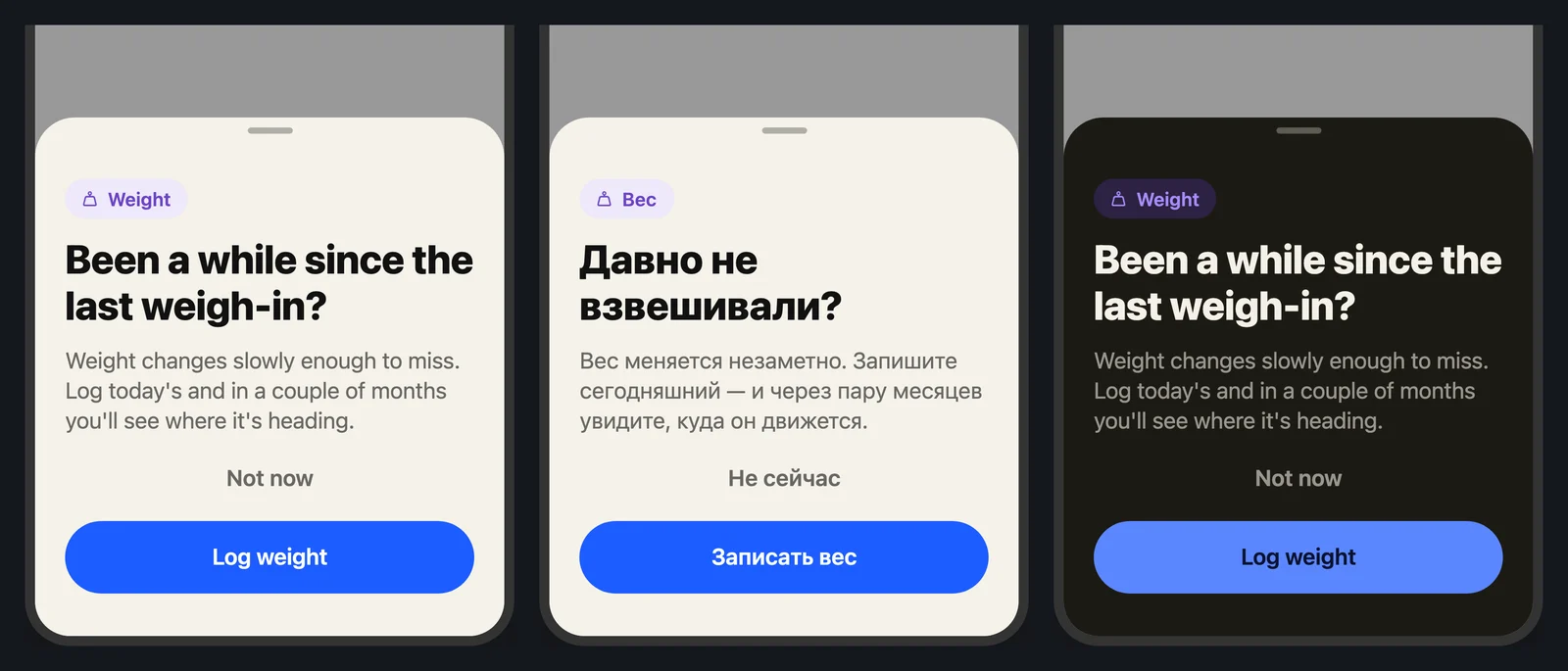
Each button runs a short, fixed list of actions:
- Log weight → records
WeighPromptAccepted→ opensnite://log-measurement?kind=weight→ closes the sheet. - Not now → records
WeighPromptDismissed→ closes the sheet.
Closing the sheet ends its list of actions, so the deep link has to come before the close.
On the device
The team checked the path on an iPhone simulator set to Russian: the sheet after opening the app from its icon, in both themes, and the app's own weigh-in screen one tap later. The weigh-in screen opened in under a second, while the sheet was still sliding away, so the app needed no extra code to wait for it.
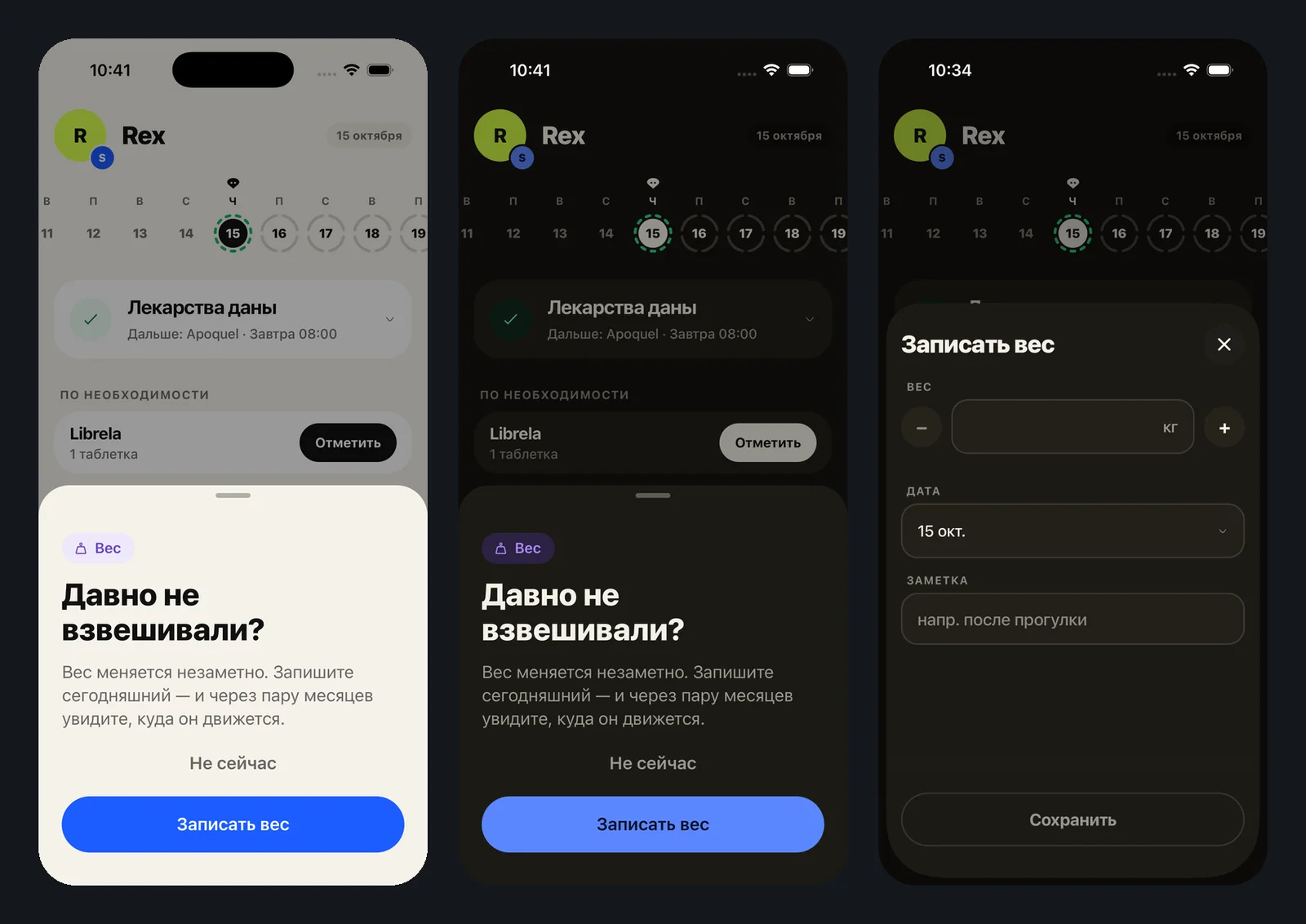
One thing to expect when you test: right after a campaign is switched on, the phone fetches the new configuration in the background, so the sheet showed up from the second launch, not the first.
Where it must stay quiet
The most useful page of the brief was the list of people who should not see the reminder, and what keeps it from them. Three cases are knowingly left uncovered:
| Case | What handles it |
|---|---|
| A brand-new user, first week | Install date: Amply first ran on the phone more than 7 days ago |
| A new user who entered the weight during setup | The weigh-in condition: that entry counts |
| Opened the app from a dose reminder | The trigger needs source = launch |
| Opened the app from a link or an invite | Same: a link reports link |
| Fixed a typo in an old entry | Only action = created counts as a weigh-in |
| Already saw the sheet once | One impression per device |
| Weighed before the app started sending events | Not covered. To Amply that is “never”, so they get asked once. Accepted. |
| Someone else weighed the dog on their own phone | Not covered. At most one unneeded question per device. Accepted. |
| Two dogs: one weighed recently, one not | Not covered. A weigh-in of either dog counts, so the sheet stays quiet. The error is on the safe side. |
The last case is a limit of the targeting, not of the campaign. The events say that a weigh-in happened, not which dog it was for, and the conditions look at the phone, not at each dog, so “this dog hasn't been weighed in a month” can't be expressed in this campaign.
What needed code, and what didn't
| Piece | Where it lives | Needed an app release? |
|---|---|---|
| RecordSaved and ScreenShown events | App (already shipped) | No |
| Deep link to the weigh-in screen | App (already shipped) | No |
| Audience, trigger, limit | Amply dashboard | No |
| The sheet: layout, copy, translations, buttons | Amply Studio | No |
Nothing in the app changed, and the next iteration doesn't need it to. The 30 days, the 7 days, the trigger, the limit, the copy, a third language, a second campaign on the same events: each is an edit in Amply that reaches phones without an app release or a store review.
The metric
Success is the share of impressions followed by a weight logged in the same session. The path is WeighPromptAccepted → the weigh-in screen reporting ScreenShown with name = LogMeasurement and source = campaign → RecordSaved with kind = weight and action = created.
The guardrail is the share of “Not now” taps (WeighPromptDismissed). Amply counts the impressions; the two button events give the split.
How it was set up
The brief and the configuration came out of a working session between the app's owner and two coding agents, one on the app and one on Amply. The campaign was created through Amply's MCP server (the connection that lets AI agents work in Amply). Campaigns created that way are always drafts, and switching one on needs a separate permission, so the switch waited for the owner's explicit yes.
The weigh-in reminder also wasn't the first idea. The session started with a prompt inviting a second carer, aimed at people who give the medication alone. The owner dropped it: for a dog with several circles of carers, the question had no single answer. Building a prompt was easy. Deciding which one was worth running was the real work.
Adapt it to your app
The same pattern fits any app built around a habit that quietly stalls: a fitness log, a budget review, a plant watering schedule, a backup.
- Find the habit event. The one action that proves the habit is alive: a weigh-in, a workout logged, a budget reviewed, a backup run.
- Target on “time since the last one, or never”. Pick the gap after which the habit has clearly stalled, and decide on purpose whether “never” belongs in the audience.
- Trigger on a calm moment. An app opened from its icon, not from a notification or a link, when the person is less likely to be mid-task.
- Ask once, and link straight to the screen. One impression per device, and a button that opens the exact screen where the habit happens.
If your app already reports its events with a little context, such as what kind of record was saved and how a screen was reached, you probably already have everything a campaign like this needs.
For your product team. Write the brief before the campaign: the habit, the gap, the calm moment, who must not see it, and the number that decides whether it keeps running. That part takes product judgment.
For your developers. Report the key actions with a little context, and give the screens that matter a deep link. After that, a campaign like this one is set up in Amply, not shipped in the app.